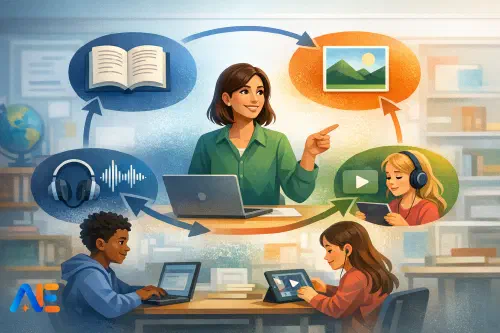
What multimodal changes
“Multimodal” simply means an AI system can work with more than one type of input or output: text, images, audio, and sometimes video. In classroom terms, it changes the routes pupils can take to show their thinking, not the standards you expect. A pupil might explain a science process in spoken form before writing it, or annotate a diagram before attempting a paragraph. That can be a gift for accessibility, particularly for pupils with literacy barriers, EAL, or processing needs. It also helps you separate “I can think” from “I can write”, which is often what you actually want to diagnose.
What it does not change is your responsibility for safeguarding, data protection, and assessment validity. Multimodal tools can increase risk if pupils upload faces, names, locations, or identifiable work without controls. They can also blur authorship if you do not require an evidence trail. If you want a useful snapshot of what current tools can do (and the classroom opportunities they open up), see Google Gemini 2.0: multimodal classroom potential. The key is not “more modes”, but deliberate movement between modes with checkpoints you can see.
The four-channel routine
The “four-channel” routine is a learning cycle: Text → Image → Audio → Video → back to Text. You are not adding extra tasks for the sake of it. You are choosing the mode that best supports the cognitive move pupils need next, then returning to text as the assessable artefact.
In practice, the cycle looks like this. Pupils begin in text with a tight prompt and a clear success criterion, often producing a rough plan, key terms, or a short explanation. They then shift to image to externalise understanding: a labelled diagram, an annotated source, a storyboard frame, or a concept map. Next comes audio, where pupils rehearse language and reasoning aloud: a 30–60 second explanation, a paired “teach-back”, or an oral justification of choices they made in the image. Then video is used sparingly and purposefully: a short screen recording of their annotated image with narration, or a micro-demonstration of a method. Finally, pupils return to text to produce the assessed response, drawing directly on the earlier artefacts.
The discipline is the point. Pupils are not “using AI”; they are following a routine that makes thinking visible, supports different learners, and leaves a trail you can audit.
Set-up in 10 minutes
You can set this up quickly if you keep roles, rules, and data minimal. Start by assigning simple roles within pairs or threes: one pupil drives the device, one reads the task and checks the rubric, and one acts as the “evidence keeper”, ensuring each stage is saved or logged. Rotate roles weekly so the same pupils do not always carry the literacy load.
Next, set two rules that reduce risk and increase learning. First: no personal data and no identifiable images. Second: every AI interaction must be captured in the paper trail. That paper trail can be a printed “Four-Channel Log” stuck in books, a shared template, or a slide with four boxes. Pupils paste prompts, outputs, and brief reflections such as “What I changed” and “Why I trust this”.
Finally, adopt a minimum-data workflow. Use generic, teacher-provided materials where possible: de-identified excerpts, stock images, teacher-made diagrams, or photographs of objects rather than pupils. If pupils must use their own work, keep it to text that contains no names or sensitive context. For wider classroom culture and responsible use routines, Digital citizenship and AI is a helpful companion read.
Prompt patterns that travel
The most effective prompts are not clever; they are consistent. Pupils learn faster when the same prompt frames reappear across subjects, with small adaptations. You can teach these as “sentence stems” for AI, just as you teach sentence stems for writing.
A reliable starting frame is: “Act as a [role]. Using only the information provided, produce [output]. Include [constraints].” In geography, the role might be “fieldwork coach”; in literature, “close-reading tutor”; in maths, “worked-example explainer”. The constraint “using only the information provided” is doing safeguarding and integrity work for you.
Another portable frame is the “compare-and-revise” loop: “Here is my answer. Mark it against this rubric. Identify two strengths, two gaps, and suggest one improvement. Do not rewrite it.” This keeps ownership with the pupil while still leveraging feedback.
For multimodal movement, a particularly strong frame is: “Convert this into another mode, keeping meaning unchanged.” For example: “Turn this paragraph into a labelled diagram”, or “Turn this diagram into a 45-second spoken explanation using these key terms.” The goal is translation of understanding, not generation of new content.
Activity bank
You can run the four-channel cycle as a whole lesson, or as short “mode hops” within a lesson. A starter might begin with text: pupils generate three key questions from a short passage, then shift to image by selecting or sketching an icon for each question to show what it is really about. In modelling, you can display a teacher exemplar, then use audio for a “think-aloud” where pupils explain why the exemplar meets the success criteria, before returning to text to annotate it.
Guided practice works well when pupils create an image artefact that you can circulate and check quickly, such as an annotated diagram or a storyboard. You then use audio as a low-stakes rehearsal: pupils record a short explanation, or deliver it to a partner, while you listen for misconceptions. Independent work returns to text for the assessable product, but pupils must cite which earlier artefact they used: “I used my diagram labels to structure paragraph two.”
For plenary, video can be a two-minute “gallery walk” of screen recordings: pupils narrate one improvement they made after feedback. Homework can be a low-device variant: pupils take a photo of a hand-drawn diagram (no faces), record a short audio explanation, and bring both to the next lesson to convert into a written response in class.
Discover the power of Automated Education by joining out community of educators who are reclaiming their time whilst enriching their classrooms. With our intuitive platform, you can automate administrative tasks, personalise student learning, and engage with your class like never before.
Don’t let administrative tasks overshadow your passion for teaching. Sign up today and transform your educational environment with Automated Education.
🎓 Register for FREE!
Accessibility by design
Multimodal routines are a practical way to build accessibility in from the start rather than bolting it on later. For EAL pupils, the image and audio stages reduce the reading load while still developing academic language. A pupil can rehearse a history explanation orally using key terms before attempting the written paragraph, and you can focus feedback on precision rather than fluency alone. If you want deeper strategies beyond “just translate”, AI for EAL/ESL beyond translation offers useful approaches.
For SEND, the cycle supports chunking and processing time. Image stages help pupils who struggle with working memory by externalising steps. Audio supports pupils who can explain but freeze when writing. Low-reading-load options include teacher-provided summaries, dual-coded vocabulary mats, and prompts that ask for “three bullets” before any full sentence. Low-device variants are entirely possible: pupils can sketch images on paper, rehearse audio with a partner rather than a recorder, and use the teacher’s device for occasional capture of evidence.
The crucial move is that accessibility support does not replace the learning goal. It changes the route, then returns pupils to the same destination.
Assessment integrity
If you want multimodal AI without losing integrity, design for “evidence of process”. Require pupils to submit the four artefacts (text, image, audio notes, video notes) alongside the final text, even when only the final text is graded. That makes it harder to outsource the whole task and easier to spot sudden jumps in quality. Where platforms allow it, use version history and insist on timestamps or stage labels such as “Draft 1 (before feedback)” and “Draft 2 (after feedback)”.
Oral checks are your friend. A 30-second conference—“Talk me through why you chose this example”—often tells you more than a plagiarism checker. You can also use “AI-visible” rubrics: criteria that explicitly reward process evidence, source discipline, and justified revisions. For example, “Shows two documented revisions with reasons” or “Uses subject vocabulary accurately, explained in the pupil’s own words.” For a broader rethink of what originality can mean in the AI era, Redefining originality assessment 2024 is worth revisiting.
Finally, restrict where AI is allowed. It is reasonable to permit AI for planning, vocabulary support, or feedback, but not for generating the final assessed response. The four-channel routine makes those boundaries teachable: AI can support the transition between modes, but the final text must be the pupil’s synthesis.
Safeguarding and privacy
Multimodal tools raise the stakes because images, audio, and video can contain identifiers even when pupils think they do not. Set a non-negotiable rule: pupils do not upload faces, names, addresses, school logos, timetables, or anything that reveals location. “No uniforms, no name labels, no classroom displays” is a simple mantra. For images, prefer teacher-provided materials or object-only photos taken against a plain background. For video, default to screen recordings of work rather than filming pupils.
Teach “what not to upload” with concrete examples. A photo of a worksheet with a pupil name is personal data. A screenshot with a chat window showing names is personal data. A voice recording that includes another pupil’s full name is personal data. Keep supervision tight by positioning screens where you can see them, circulating during image and video stages, and using a shared “pause” signal when you need all devices face-down.
Protocols matter more than promises. If a pupil breaks the rule, have a predictable response: stop the activity, delete the upload where possible, log the incident, and reset expectations. The routine works because it is controlled.
Two-week rollout
In week one, teach the routine with low-risk content and high structure. Choose a short topic with clear vocabulary and a simple final output. Run the cycle slowly, modelling how you capture the paper trail and how you decide what to keep or discard. Build in reflection prompts such as “Which mode helped you most?” and “What did you change after listening to your audio explanation?”
In week two, increase independence but keep the same frames. Pupils should start selecting which image format to use (diagram, storyboard, concept map) and which audio rehearsal suits them (paired teach-back, short recording, live explanation). End the fortnight with a simple review: look at three pupil trails and discuss what “good evidence” looks like.
Include “stop if…” criteria so you stay in control. Stop if pupils are uploading identifiable images, if the paper trail is not being kept, or if the final text quality no longer matches pupils’ oral explanations. Those are signals to tighten boundaries, not abandon the approach.
May your multimodal routines bring clearer thinking, calmer classrooms, and more trustworthy evidence.
The Automated Education Team